Dot Net Fluke: Getting by on C# for iSeries RPG Developers

Useful tutorials on C# and .NET for RPG iSeries AS/400 developers. Brought to you from the folks at AranRock Consulting

9/1/10

Do I really need to know that?

An afternoon reviewing another C# book felt, yet again, like running in snowdrift. Typical with these kind of books, the first few chapters smother you in infrastructure pedantry, acronyms and background. If I needed to build an average house, would I really, really need to know the history of the lumber industry? The molecule structure of concrete? No. I need to learn how to build a house quickly, efficiently and inexpensively. Similarly, detailed information on the CTS, CLR and FCL are not needed to get a grounding in C#. This is what appendii were invented. Stick all the stuff that people don't need up front into the back of the book where they might need it once they finish reading the book.
This front-loading poses a problem because newbies tend to read the first few chapters very carefully. Each section is carefully scrutinized and digested. But then they discover that the information they spent so much brain power absorbing, isn't actually useful. There is no way to determine the quality or usefulness of information presented in the early stages. By the end of the third chapter, the reader thinks 'Ok...I think I got that, the Common Language Runtime sits on top of the OS, the Framework Class Library is above that for IO and streaming, then there's ADO.Net with XML and whatnot and then my application runs on top of that again' But NONE of this will definitely help you write a program. It's information and often it is interesting but it is not helpful information that leads a developer to realizing their own educational goal . I DON'T CARE how Microsoft layers its development environment because I can't do anything about it - it's out of my sphere of control. What I can control is an application. Show me how to develop quickly, efficiently and show me how C# solves common programming problems.
The volume of information is already overwhelming so why do authors make life difficult for newbies by being overly academic? Why do programming books, in the main, focus on the complexities of the language infrastructure rather than on adaptive, simple application development?
If you know of good development books that break the pedantic paradigm, post 'em here.

Labels: , , ,

3/19/10

Connection String Stinger - Phantom Library List

.Net can look for your tables in a library the same name as your user id  even if you supply a library list. This can cause your SQL 'selects' to fail.
Take a look:
Here's a basic connection string using the IBM supplied iDB2 Classes:
DataSource=192.168.0.1; UserID=colm;Password=xxxx;LibraryList= CusLib,ARlib, QGPL

At first glance everything looks good, right?
So now I want to get at my table MYCUST in CusLib. Should be a no brainer. However if I run the SQL command 'Select * from MYCUST' guess what I get?  - A big fat error like this:
SQL0204 - File MYCSUT in COLM not found
What??. CusLib is on the TOP - I don't even mention library Colm.  What's going on?
IBM says that if you are using the SQL naming convention that it sets the default collection or library to the library with the same name as the user id. I have no idea why they do this! Anyway if you have this issue the simple fix is to specify the default collection. i.e. defaultcollection=cuslib
Here's the new connection string
DataSource=192.168.0.1; UserID=colm;Password=xxxx;LibraryList= CusLib,ARlib, QGPL;DefaultCollection=CUSLIB

Labels: , , ,

1/14/10

How to video: Access data on iSeries using ADO.NET

Here is a super simplified video example of a C# application reading from a table on an iSeries. It uses the IBM .net managed provider (See Different ways to access iSeries data and this) . You have this  if you have IBM Client Access. If not, download the technology preview here. Sound problem? jiggle the player control if the sound goes out (I'm trying out demo utility software let me know what one you use.)
.

To view the video click here.

To download the project used in the video, click here.

Subscribe to DotNetFluke to receive weekly useful tips for integrating .NET with the iSeries.
If you have any iSeries/.NET integrations questions or suggestions for articles email me at cbyrne+blog@AranRock.com

Labels: , , , , ,

7/15/08

Read, write and delete files in windows

Sooner or later you'll need to access files from the Window's file system. You'll need to check if a file exists, delete it, move it  , you'll need to read and write to it and upload data from it to an iSeries table etc.

To illustrate how easy this is, I've included a full C# project.


This program cleans up a desktop. It moves unwanted items automatically to a 'clean up' folder automatically. Items you don't want to remove are maintained in a text file manually. This file is in 'CleanUp' on your desktop after you run it the first time.
Set it up to run in 'scheduled tasks' to run daily. My desktop gets absolutely splattered with downloads, images, files etc. etc.  Now it gets cleaned automatically and the stuff I want to keep is always there. Files are moved but not folders. 


The app demonstrates two things.

  1. How to access the windows file system
  2. How to write a RPG-like app in C#. i.e. in a procedural way  There is a 'main', an init etc. There are no class objects created, everything runs from the class. Methods are just like subroutines. Variables are defined that are needed throughout the application as public at the top of the class. (If you define a variable in a method - it is only available within that method.)

Please improve on this app and sent it back to share!

Download the attached visual studio project from here. (VS 2008)
If you just want the program executable itself download it here.

using System;
using System.Collections.Generic;

using System.Text;
using System.IO;

using System.Security.Principal;


//Lists each object on the desktop
//Checks if the object is in the list.
//If not, moves it to cleanup.

namespace ClearDesktop
{
class Program
{

// Declare class level variables that are accessible from all methods
public static string cleanUpFolder = @"Cleanup\";
public static string desktopPathAllUsers = @"
C:\Documents and Settings\All Users\Desktop\";
public static string desktopPath = "
";
public static string cleanUpPath = "
";
public static string cleanUpFile = "
";
public static string allowedOnDesktop = "
";


// Main Routine
static void Main(string[] args)
{
initializationRoutine(); // Set paths needed

RemoveFilesFromDesktop(desktopPath); // remove unwanted files
RemoveFilesFromDesktop(desktopPathAllUsers); // some file paths are in 'all users'
// Console.ReadLine();
}


public static void RemoveFilesFromDesktop(string dir)
{
// First create directory object from the desktop path
DirectoryInfo mainDir = new DirectoryInfo(dir);


// This single line fills an array called 'items' of everything on the desktop

// The items in the array are not strings but FileSystemInfo objects.


// What's cool here is each item has a ton of methods and properties


       // available directly from it.


            FileSystemInfo[] items = mainDir.GetFileSystemInfos();


// Now go through each item in the array and check if it is allowed
foreach (FileSystemInfo item in items)
{
// Check if the file on the desktop is in the 'allowed' file
bool allowedyn = allowedOnDesktop.Contains(item.Name.ToString());

if (item is FileInfo && !allowedyn)
{
// If it is to be moved any existing same name file has to be deleted
String alreadyExists = cleanUpPath + item;

if (File.Exists(alreadyExists))
{
try
{
// Delete the file with the same name
File.Delete(alreadyExists);
}
catch (Exception)
{


}

}

// Move the file on the desktop to the clean up folder
((FileInfo)item).MoveTo(cleanUpPath + item);

}

}
}


// Get a list of all the files allowed on the desktop
public static string WhatsAllowedOnTheDesktop(string logFileName)
{

string contents = "
";

using (FileStream fileStream = new FileStream(logFileName,
FileMode.Open,
FileAccess.Read,
FileShare.None))
{
using (StreamReader Reader = new StreamReader(fileStream))
{
contents = Reader.ReadToEnd(); // Reads the entire file in one statement
Reader.Close();
fileStream.Close();
}


}
return contents;
}

// Write to the 'Allowed files' directory those files you don't want to move
public static void WriteToLog(string logFileName, string data)
{
using (FileStream fileStream = new FileStream(logFileName,
FileMode.Append,
FileAccess.Write,
FileShare.None))
{
using (StreamWriter streamWriter = new StreamWriter(fileStream))
{
streamWriter.WriteLine(data);
}
}
}

// Do basic setup - path names etc.
public static void initializationRoutine() {
string username = getUserName();

desktopPath = @"
C:\Documents and Settings\" + username + @"\Desktop\";
cleanUpPath = desktopPath + cleanUpFolder;
cleanUpFile = cleanUpPath + @"
CleanUpFile.txt";

// If the cleanup directory does not exist, create it
if (!Directory.Exists(cleanUpPath))
{
Directory.CreateDirectory(cleanUpPath);
}

// Create the log file of items you want to keep on the desktop

if (!File.Exists(cleanUpFile))
{
File.Create(cleanUpFile);
}

allowedOnDesktop = WhatsAllowedOnTheDesktop(cleanUpFile);
}

// Get the log on name of the user who started the app in order
// to know the path of their desktop
public static string getUserName()
{
WindowsIdentity ident = WindowsIdentity.GetCurrent();

string userid = ident.Name;
string username = "
";
int pos = userid.IndexOf("
\\");
if (pos > -1)
{

username = userid.Substring(pos + 1);
}
else
{
username = userid;
}


return username;

}

}


}

Labels: , ,

7/7/08

When a method calls itself

This you can't do in RPG - have a method call itself. Sounds like something you would never use? Think again.

See this small console program that recurses through directories to get a list of folders and files. When the method finds a directory, it calls itself with the sub folder as a parameter whereupon the File part of the IF statement is executed.

using System;
using System.Collections.Generic;
using System.Linq;
using System.Text;
using System.IO;


namespace ConsoleApplication1
{
class Program
{
static void Main(string[] args)
{
Recurse(@"c:\temp");
}

public static void Recurse(string directory)
{
DirectoryInfo path = new DirectoryInfo(directory);
FileSystemInfo[] files = path.GetFileSystemInfos( );
foreach (FileSystemInfo file in files)
{
if (file is DirectoryInfo)
{
Console.WriteLine("Folder-> " + ((DirectoryInfo)file).FullName);


// Now the method calls itself passing in the subfolder name. When the method is called
all the files in the subfolder are listed

Recurse(((DirectoryInfo)file).FullName);
}
if (file is FileInfo)
{
Console.WriteLine("File-> " + ((FileInfo)file).FullName);
}

}


}

}
}


Labels: , , ,

6/17/08

C# -'The worst bloody language in the world'

My brother-in-law, a Phd wielding university prof.who has a penchant for the complex and abstruse called around yesterday to declare the whole .Net  bouquet and the languages contained therein 'the worst bloody language in the world'.  He came to me asking some very simple questions such as how to read a customer file, display it in a windows form, process it etc and was soon bogged down in connection strings, data binding, data sets etc. "But I just want to display the data and read it!" he exclaimed. He was astounded that the columns in a table aren't easily directly accessible when using SQL which isn't checked until run-time (LINQ I suggest? " Yeah but you still have to go thru hoops!"). 
Coming from procedural languages like RPG, I can sympathize. If I want to process a table in RPG  to check spending limits of a customer and update the table I do this

F CustomerFile IF   K DISK

C Read CustomerFile;
C DOW not %eof;
C If AmountSpent > CreditLimit;
C AllowSpending =False;
C Update CustomerFileR;
C Endif;


C  Read CustomerFile;
C EndDO;


The equivalent in C# is much more complicated and includes connection strings, command text and a data reader which all have to be set up.

Note that for the ONE 'F' declaration in RPG there are 3 in C#.  To even do a read needs to be setup - you need to create a data reader first. Imagine having to 'create' a read statement in RPG! The code doesn't even include the update functionality!  But the biggest problem is that column names are not typed directly in C# meaning you can't refer to the column name directly. The column 'AmountSpent' is not known to the C# program.   Linq alleviates this situation but you still have to do the setup work first.  I understand the frustration.


using System;
using IBM.Data.DB2.iSeries;

namespace iSeriesADOexample
{
class Program
{
static void Main(string[] args)
{
iDB2Connection connection =
new iDB2Connection("DataSource=PUB1.RZKH.DE; UserID=XXX; Password=xxx; DefaultCollection=COLMBYRNE1; LibraryList=COLMBYRNE1, *USRLIBL");
iDB2Command cmd = connection.CreateCommand();
connection.Open();

cmd.CommandText = "Select * from COLMBYRNE1.CUSTOMERFILE";

try
{
iDB2DataReader dataReader = cmd.ExecuteReader();
while (dataReader.Read() == true)
{

Double AmountSpent = dataReader.GetDouble(3);
Double CreditLimit = dataReader.GetDouble(4);

if (AmountSpent > CreditLimit)
{
DoUpdate();
}

}
}
catch (iDB2SQLErrorException e)
{Console.WriteLine("Error:" + e.MessageDetails);
}
Console.Read();
cmd.Dispose();
}
}

}


Programming is the art of bringing ideas to life. That's what my brother-in-law came to me for. He had an idea for a program and wanted to make it real. Unfortunately the initial  hurdle to create his simple program was far too great. The wizard functionality in Visual Studio only highlights how difficult it is to do basic actions like read a table, display the contents, process the results and update the table. This is one of the most common programs that every programmer creates yet in .NET it is difficult for a beginner.

It is clear Microsoft have 5-10 years to go before .NET is really mature and allows both beginner and seasoned developer to easily bring their ideas into the world. We program to make things better, faster, more fun, more interesting - not harder.  The tools we use then should also be better, faster - not harder. The effort to use a tool must never be greater than the effort it takes to solve the problem logically.  (Byrne's first hypothesis*) If you want to add 2 and 5 , C# should do that as easily as it does to solve it- and it does  int sum = 2+ 5;    E.g. if a client says that some of his customers are over their credit limit and needs to halt their spending then the logical solution which is to flag those spenders. The effort to implement that in C# should be that easy.  This is the benchmark which Microsoft must follow - just to keep up.

Labels: , , ,

5/5/08

LINQ to DB2 Beta available tomorrow


As you probably know the geeks at IBM have been scrambling to put together a LINQ to DB2 Entity framework ever since LINQ was announced - and by jove they've done it! 
You know what LINQ is right? It allows you to query data in C# and refer to columns in tables  by their column names directly just as you would any field in your C# program. Yes I know, this seems like an uber basic requirement for any language but at least it is done.
Initially LINQ had only SQL, XML and in-memory fields were supported but IBM, Oracle and MySQL quickly started getting in on the act to support their dbs.
We've learned here at Dot Net Fluke that IBM will announce tomorrow (May 6th) a beta of the LINQ to DB2 beta. We'll post the link when it comes available.
The bad news is that it is not yet available for the iSeries. So we'll all just have to sit and wait!

Update: Here's the announcement IBM Announces LINQ to DB2 connector

Labels: , , , , , ,

4/12/08

.Net powering LED Screens

A client asked me recently to build an auction application to manage several county fairs. No problem you'd think. But it also needed to drive an LED screen 12 feet long and 5 feet high. I went and had a look at the screen and it had a worn RS232 serial cable sticking out the back. I connected that up to my laptop with USB to Serial converter, opened up the manual and started hacking away.

mission_sign

Turns out the System.IO.Ports namespace had everything I needed. In a surprisingly short amount of time the LED lit up with auction data. Of course that was just the beginning - the application had to subscribe to different events and manage the board at the same time so that became a little tricky.

The board I was using was from EDI inc, so if you have a different manufacturer then the codes sent to the board might well differ.


using System;
using System.IO.Ports;
using System.Threading;

public class PortChat
{
static bool _continue;
static SerialPort _serialPort;

public static void Main()
{
string name;
string message;
StringComparer stringComparer = StringComparer.OrdinalIgnoreCase;
Thread readThread = new Thread(Read);

// Create a new SerialPort object with default settings.
_serialPort = new SerialPort();

// Allow the user to set the appropriate properties.
_serialPort.PortName = "COM2";
_serialPort.BaudRate = "1200";


        _serialPort.Parity = "0"
_serialPort.DataBits = "8";
_serialPort.StopBits = "1";
// Set the read/write timeouts
_serialPort.ReadTimeout = 500;
_serialPort.WriteTimeout = 500;

_serialPort.Open();
_continue = true;
readThread.Start();

Console.Write("0x00 This writes to Line 1 0x00");


          Console.Write("0x01 This writes to Line 2 0x01");


       name = Console.ReadLine();

Labels: ,

3/18/08

C# Subfile - iSeries data in a C# Grid -2 no coding (with Video)

Well almost no coding.

If you look at my previous post where I showed how to code a grid in C# using data from the iSeries we manually coded the grid, the data set and the connection. This example accomplishes the same result except you'll be done in under 5 minutes!  It uses the IDE to build the grid, data set, adapter, connection and SQL command.

The video also shows how to add in the iSeries .net data components to your Visual Studio toolbox.
This post easier shown than discussed - so check out the following video.
play

Steps

  1. Create a windows form application project
  2. Add in the IBM dll to your references
  3. Add in the IBM data tools to your toolbox using Tools, Choose Toolbox items and filter 'idb2'
  4. Add a basic grid to your form
  5. Drag the iDB2Connection, IDB2Command, iDB2DataAdapter and a data set to your form
  6. Configure each by right clicking and selecting properties
  7. Double click outside the grid to bring up the code for the Load method of the form.
  8. Add in the following code
    iDB2DataAdapter1.Fill(dataSet1);
    dataGrid1.DataMember = dataSet1.Tables[0].TableName;
  9. Run the program!

Labels: , , , , , ,

3/17/08

C# Subfile - Display an iSeries table in a Grid

We're all used to subfiles on the iSeries. Who can fondly recall many a debate over page by page vs. load all subfile?   How do you create the equivalent of a subfile in .Net?

Easy.

images

Download the visual studio project from here.
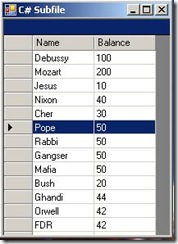
subfile

Here's a basic example to get started. The Visual Studio IDE can actually do a lot of the work for you. You can even create a grid (read subfile) with just one or two lines of code. (Post to come)  However, it's more prudent to begin with code you can understand rather than wading through what looks like binary spaghetti.

This example also introduces data sets and data tables. Data sets are just like data structures but without any definition and data tables are just like the field definitions of data structures -not to be confused with tables in databases. We use Data sets and data tables to disconnect from the data source. Connect to the data source, get the data, fill the data set with the data, disconnect from the data source and use the data set in lieu of the actual data. Another way to think of data sets is to think of them as a cache, bucket, container, plastic bag. See my earlier post on data sets for more info.


Steps

  1. Define your grid (i.e. subfile)
  2. Attach the grid to your form (VS creates one for you auto-)
  3. Create a data set to hold your data
  4. Create a data table to define the fields in the data set
  5. Add the data table to the data set
  6. Connect  to your iSeries
  7. Execute an SQL statement to read from a table
  8. Read each row and add to the data set
  9. Disconnect from the iSeries
  10. Attach the data set to the grid
  11. Display the grid

It sounds like a lot of work just to output data to a grid - and it is. Why bother with the data set and the table - can't I just write directly out the grid? Yes you can - but this example is here to show you not only how to display data in a grid from the iSeries but how to best manage that data as well. A Data Set will help you do that. 
It is true that there are much simpler approaches on the iSeries but that comes at a price. Once you get out of the db2 and green screen box things get quite tricky on the As/400.  .Net is more complicated yes but its complexity comes from flexibility.

iSeries prerequisites:

The table on the iSeries in this example is called customers. Create it in library QGPL
create the table in DDS or go into SQL by typing 'strsql' in the iSeries command prompt and create the table as follows:

CREATE TABLE QGPL/CUSTOMERS (NAME CHAR (30 ) NOT NULL WITH DEFAULT,
BALANCE DEC (5 ) NOT NULL WITH DEFAULT)

Add records using the INSERT sql command, DBU or your favorite data editor on the iSeries

C# Code:

This is the code for the form. The 'Program.cs' in solution explorer is unchanged. Simply create a windows project, double click on the form that appears and replace all the code with the code below. Insert your iSeries IP address and make sure you have created the iSeries table as describe above or replace with your own ensuring that you correctly specify the columns.  

using System;
using System.Collections.Generic;
using System.ComponentModel;
using System.Data;
using System.Drawing;
using System.Text;
using System.Windows.Forms;
using IBM.Data.DB2.iSeries; // Make sure you add this under 'References' in Solution Explorer
// You need the above reference as a dll which is part of iSeries client access.

namespace iSeries_Grid
{
    public partial class Form1 : Form
    {
        public Form1()
        {
            InitializeComponent();
        }

        private void Form1_Load(object sender, EventArgs e)
        {
            //Define the grid size
            DataGrid subfile = new DataGrid();
            subfile.Location = new Point(0, 0);
            subfile.Size = new Size(400, 500);

            //Attach it to the form
            Controls.AddRange(new Control[] { subfile });


            // Create a DataSet to hold data from iSeries Table
            DataSet dataStructure = new DataSet();

            //Create a table to hold the iSeries data
            DataTable dt = new DataTable("Customers");
            dt.Columns.Add("Name");
            dt.Columns.Add("Balance");


            //Add the datatable to the data set
            dataStructure.Tables.Add(dt);

            // Open connection to the iSeries
            iDB2Connection conn = new iDB2Connection();
           conn.ConnectionString = "DataSource=192.168.0.1";

 // You can put "UserID=myuserid;Password=mypass" 
//
if you don't want to be prompted

// Create a command to select records from the customer table
iDB2Command command = new iDB2Command();
command.CommandText = "Select * from qgpl.customers";
command.Connection = conn;
// ties the command to the connection to the iSeries

conn.Open();

// Execute the sql statement. Get a Data Reader object
iDB2DataReader readFile = command.ExecuteReader();

// Read each row from the table and output the results into the data set

while (readFile.Read())
{
// Create a row to hold data
DataRow datarow = dataStructure.Tables["customers"].NewRow();

datarow["Name"] = readFile.GetString(0);
datarow["Balance"] = readFile.GetiDB2Integer(1);

// add the row to the data table customer
dataStructure.Tables["customers"].Rows.Add(datarow);


}

// Clean up - Close connections
readFile.Close();
command.Dispose();
conn.Close();

// Attach the data set to the data grid
subfile.DataSource = dataStructure;
subfile.DataMember = dataStructure.Tables[0].TableName;


// Display the subfile
subfile.Show();


} // End of Method


} //End of Class

} // End of Namespace


This code is based on an example in the IBM .Net Redbook modified

for this post.

Labels: , , , , ,

3/16/08

Reading an iSeries table in C# (with video)

Here's another simple example of reading a table in C# from the iSeries.
vid  See the video for this here. 

images

   Download the Visual Studio Project here

As you can see (line 13)  all you need in the connection string is the IP address of your machine. If you don't include the log on parameters -UserID=myuser; Password=mypass, then you will be prompted for them by the iSeries.
You need to include the IBM .net provider in your 'References' in your Visual Studio project. It's located in the Client Access directory. If you don't have client access, then download the 'technology preview' from IBM for free.

   1:  using System;


   2:  using System.Collections.Generic;


   3:  using System.Text;


   4:  using IBM.Data.DB2.iSeries;


   5:   


   6:  namespace Prez_Rank


   7:  {


   8:      class Program


   9:      {


  10:          static void Main(string[] args)


  11:          {


  12:              iDB2Connection conn = new iDB2Connection();


  13:              conn.ConnectionString = "DataSource=192.168.0.1";


  14:              conn.Open();


  15:   


  16:              iDB2Command cmd = new iDB2Command();


  17:              cmd.CommandText = "Select * from colm.customers";


  18:              cmd.Connection = conn;


  19:   


  20:   


  21:   


  22:              iDB2DataReader dr= cmd.ExecuteReader();


  23:   


  24:              while (dr.Read())


  25:              {


  26:                  Console.WriteLine(dr.GetString(0));


  27:   


  28:              }


  29:              Console.ReadLine();


  30:   


  31:          }


  32:      }


  33:  }


Labels: , , , ,

3/5/08

RPG Variables vs C# Variables

In RPG we define variables in our 'D or C Specs.  We don't have to  uniquely declare character or numeric-  just the inclusion of a value in the decimal places column is enough. Leave it out and you just defined a character variable.
For the most part this is all you need to write 90% of business applications. There are other variable types such Binary, Graphic etc but these are encountered less often.
 

DName+++++++++++ETDsFrom+++To/L+++IDc.Keywords++

D NameofDog       S             24              
D Counter S 2 0
D Price S 5 2
D Datefield S D

Here's the equivalent in C#


String NameofDog;
int Counter;
decimal Price;
DateTime datefield;


The first thing that you will notice is that there is no length defined for the fields in C#. That's a great improvement over RPG where you usually explicitly declare length and end up in lots of trouble when a value gets chopped off when moved to a smaller field.

In C# there are way more value types than needed such as byte (for numbers 0-255), sbyte, short, long, float etc.


Common Value Types in C#


Int - integer - whole numbers (no decimals). Useful for counting.


string - holds alphanumeric values


bool - true or false (similar to indicators)


double any decimal up to 15 significant digits


decimal - any decimal up to 28 sig. digits


The variable declarations in RPG did not quite translate to C#. There is no Date value type in C#.  The statement ' DateTime datefield;' declares an object reference called datefield. How do I know this? Only because I know there is not value type of date in C#.  The fact that I am declaring an object called datefield just as I would a variable value brings up all sorts of interesting things about C# - mainly that objects are just another kind of variable. More on that later.


What about Operations on variables?


Let's add 1 to Counter in RPG and C#


RPG


Counter = Counter + 1;


C#


Counter = Counter + 1;


The code is the exact same in both!  There are other differences but we'll get operations in another post.


Lot's of free stuff inside


When you declare a variable in C# whether it is a value type like an integer or a 'reference' type like the DateTime object I created, along with the variable comes packaged  actions you might need on it.  In RPG if I want to convert my counter to a string variable, I would do the following.


RPG


Character = %char(Numeric); 


In C#, there is a method or function included in the variable when you declare it. The brackets indicate that ToString is a method.


Character = Numeric.ToString();


This is a fundamental and important aspect of C# - The actions you perform on variables and objects are often methods of that variable or object. If you want to trim the end of a string in C# you just say Character.Trim(); . Because you declared Character as a type String and String has all these methods now Character has them. There is no 'trim' opcode or expression. It's a method of string and when you declare a variable as a type string it gets all the methods belonging to string.

What's great about this is that you don't have to wait 10 years for IBM to come up with another op-code - you just write one yourself!  But, you may be asking, how do I know what method to use? There must be thousands. There are. However the Visual Studio IDE makes it simple and has a feature called intellisense - it fills out the statement as you type showing a drop down of all the methods and properties of an object or variable. Don't worry if this doesn't make a huge amount of sense right now. You'll get the hang of it with practice but it is one of those kind of mind-flips that is a big switch from Procedural RPG and Object Oriented C#.  It also makes sense. While RPG is an awesome language it has hit a stone wall. Creating lots of more opcodes or expressions is just going to make the language more complex. C# doesn't need lots of 'op-codes' - in fact there are about 77 in C# 2.0 and many you will never use. Most actions come from methods in classes.

Labels: , , , ,

2/7/08

Converting from a numeric date to a date type in C# and RPG

Let's compare one of the most common and confusing tasks for all programmers - date conversion.
Given that this is such as a common programming task I am always surprised by how complex this is in many languages.
Here's our problem. Our iSeries legacy table 'Orders' is holding its order date not in the iSeries Date type but in numeric 8,0 in ISO format YYYYMMDD. e.g. ORDATE = 20081021
We need to convert this to a date type in RPG so that we can do some date work - adding a day on it subtracting order date from ship date etc.

RPG Code
Line 1 is the D-spec entry to define the converted date.
Line 2 defines the input order date (typically this comes from a db)

D OrderDateD S d datfmt(*iso)
D ORDATE S 8 0
OrderDateD = %date(ORDATE:*ISO);
// now we cand do some date work with OrderDateD!


Now lets do the same thing in C#
C# Code


Console.WriteLine("Method 2 - ParseExact Method a little simpler");
int ORDATE = 20081210;
DateTime OrderDateD = DateTime.ParseExact(ORDATE.ToString(), "yyyyMMdd", System.Globalization.CultureInfo.InvariantCulture);
Console.WriteLine("Date as numeric entered YYYYYMMDD {0}", OrderDateD);

In C# you use the ParseExact method to convert from YYYYMMDD or any other format.
1. Create a date type OderDate with the statement 'DateTime OrderDateD'
2. Assign it the value of ORDATE after parsing it first

The ParseExact method takes 3 parameters
a) The input date in whatever format but converted to a string. We use ToString to convert
b) The fomat of the input date which is specified here as YYYYMMDD. Click here for formats
c) The 'invariant' culture property to tell the method that this is a non standard format. How geeky!

There is another method called 'Parse' but ParseExact is used here because you can specify (in the second parm) the EXACT format that may not confom to any particular standard. This is really handy for handling obscue legacy stored dates in old iSeries tables.
The Parse method though is really clever so when you are using standard date formats it can automatically figue out your date format without telling it what format you are using.

I think its fair to say that the RPG approach is simpler and easier to understand. However there is more flexibility in the C# approach.

DOWNLOADS
See the C# code as a full project which shows both Parse and ParseExact
Also here's an RPG date cheat sheet code adapated from a post by Mitchel Laman
Which fomats to use when describing your input? Click here

Labels: , , , , ,

1/18/08

Comparing RPG code to C# : The For Loop

There are similarities between free format RPGIV and C#. In the example below I show a small program that accomplishes the same task in both languages. The task is to find the first blank character in a string from the end to the beginning. I'm well aware there is a single method available for this on String in C# but the purpose here is to show the similarities.
RPG is below:


Now C#:


You can see some basic similarities:
  • Statements end with a ';' ,

  • the For loop is similar.

  • 'Leave' gets you out of an RPG loop while 'Break' exits a C# loop.

  • Assigning values is the same in both.

  • Declaring variables in RPGIV requires both type and how many characters (you can declare varying length variables but do define an initial length). To define a variable you must put values in fixed positions in a special kind of statement block called 'Definition Specifications' or D-specs. In C# you simply declare the type. The type of the index 'i' is denoted by a zero in the decimal placess position.

  • C# requires a 'Main' method. RPG just executes from the first executable line.

  • C# variables are local by default. I can't access that 'i' variable outside of that For loop - the program wouldn't even compile. RPG variables are global unless used in procedures.


  • C# requires a class definition, namespace and you define what other namespaces in .Net you want to refer to in your program with the 'Using' statements. The using just means you don't have to refer to the full name like 'System.Console.Readline()'.


  • C# doesn't need 'EndFor' or 'EndIf'. Coding is accomplished in blocks between curly braces '{' and '}'.


  • The biggest difference is that C# strings and objects have a multitude of methods and properties on the string itself - not part of the language. RPGIV is pretty good at string manipulation too but can never approach the flexibility of C# as the RPG designers would have to create a new keyword when it needs to perform a function on a string that it doesn't already have. In C# there are only a handful of keywords - most actions are accmplished by methods on the objects themselves. For instance in the above example you access the length of a string by examining its property. e.g. 'field.length' returns an integer value whereas in RPG I chose to use the built-in-function %len to do the same thing.
    To find the first non-blank in a string starting from the end you can use field.IndexofLast(' ') . RPGers note how the methods and properties are on the string 'field' which I defined. As soon as you define a variable it creates a copy of the string object so you have full access to a huge amount of manipulation techniques. Adding new methods and properties to strings and other types isn't a major change in the language.
RPG Output below


C# Output:

Labels: , , , , ,

1/17/08

Datasets are what?

Datasets are a layer between the actual database and your application. When you need to connect to different tables and databases, datasets can help by separating all the connecting to your different data stores and working on the actual data. The analogy with RPG is that datasets are data structures. If you read a table in an RPG program and the put that data into a data structure, updated the fields in that data structure then moved the data structure back to your table then the dataset is the data structure and the bit that moves data between the table is the data adapter.
You don't need all this of course. It's part of .NET, specifically ADO.NET - that part of the framework that's supposed to make it easier to build complex data access application. The stuff that manages and brings it in and out of your application . Kind of like the way the RPG cycle (remember that?) reads in a table automatically. You can just read and write from any database without using datasets and adapters. It's just much easier and less error prone when you use data sets and adapters to manage your data. The IDE automatically creates these when you drop a table onto a form.

When you look at the code to fill a dataset from an adapter you can see there's not much too it. The key term here is Dataset. Datasets are completely separated from the database. Think of them as a data structure where you load data from your table to. The data structure knows nothing of the table where it got the data. It's just used to hold the data in memory. All queries, updates etc. are done to the Dataset not to the data store. We let the dataadapter take care of fetching data to and from the actual table.


// build a command object and prepare an SQL statement so that you can look at your table
SqlCommand buildData = conn.CreateCommand();

cmd.CommandText = "Select * from Orders where OrdQty >100";
// Build the Data Adapater - this fills a data set
SqlDataAdapter dataAdapter = new SqlDataAdapter(buildData);

// Now create the data set. The data structure which contains the data retrieved by the data adapter
DataSet orderDataSet = new DataSet();

// Populate the dataset with the Data Adapter
dataAdapter.Fill(dataSet);

Labels: , , , , ,

1/15/08

Where to get the iSeries ADO.NET data provider

The iSeries .NET data provider is the native data provider that allows you to access iSeries data and programs using .NET in a managed way.

This is a .dll (IBM.Data.DB2.iSeries.dll ) that you add in as a reference when creating .Net apps to connect to the iSeries

Once added in you have access to all the classes and methods that simplify writing applications in .Net to leverage iSeries data in the db2 database

The dll is part of iSerices Access for windows which you can download for free (when you select the technology preview). Make sure you check 'Selective Setup' and include the Data and Programmer's toolkit so you get all the data access drivers, help and tools.


  1. Download iSeries Access from http://www-03.ibm.com/systems/i/software/access/windows/downloads.html
    Select the technology preview version. You'll have do the register rigmarole.
    If the link doesn't work, google 'iSeries Access windows' to find the latest location.

  2. Install iSeries Access making sure that you select 'custom install' to include the programmers toolkit (it comes in handy as it has examples etc.) . Once you have installed iSeries Access you will find the dll in C:\Program Files\IBM\Client Access\IBM.Data.DB2.iSeries.dll

  3. In Visual Studio, open up your project. Click on the Solution Explorer, then references. Right click references and select 'Add Reference'. A dialog box appears. Click 'Browse'. Add in the dll from the location above.

  4. Add the namespace '
    using IBM.Data.DB2.iSeries;' to your code

  5. Start using the iSeries classes! The iDB2Command is what you use to run queries, IDB2Connection to create a connection string to your iSeries db, iDB2DataAdapter gives you a cache to both connect, retrieve and update a set of data.

With the native .NET provider you have support for:

  • SQL (INSERT, UPDATE, DELETE, SELECT)
  • Stored procedure support
  • Commitment control
  • Connection pooling
  • SQL naming,Unicode, Threads and multiple databases (IASPs)

To call iSeries programs use a stored procedure.

Labels: , , , , , ,

1/11/08

C# for iSeries RPG programmers

There are many iSeries RPG programmers out there who are keen to get started on another programming language that matches the flexibility and scope of RPG with the added web, windows and forms simplicity available in modern IDE's.
Which language will you invest your valuable time in? Java, PHP, Visual Basic, Delphi, Ruby, C#?


Java is a good, mature candidate since it also runs on the iSeries. Ruby is open and emerging as easy to learn, productive and object oriented. Delphi (Object Pascal) has been around for donkey's. PHP is mainly used for scripting and web pages so only server partial needs. Visual Basic and C# are just variations of Microsoft's powerful .NET platform but C# programmers get paid more. For someone still on the iSeries you will want a language that has excellent connectivity to the black box. That leaves Java and C#. C# has Linq! and is far easier than Java at creating windows desktop applications but Java does run on the iSeries. So it's a toss up but my friends, Linq pushes the argument to C#.

Let's look at C#.
C# (like Java) can be hard to read, is full of abstruse concepts such as polymorphism, inheritance and encapsulation. Five lines of RPG could be one line in c# and one line in RPG could be five in c#.
It's Geeky. At first glance code will appear to operate your vacum cleaner but will just read a file and print its contents. It gives you lots of ways to accomplish the same thing. Lots.
It's not simple. It's not easy. It's a pain in the ass.
It's a great language.

I recommend that RPG developers dive in to c# despite the challenges. The best way to deal with challenges is, of course, to ignore them. Yes, run away. Start writing code c# just as you would in RPG. In other words I am advocating to begin your next language which is built specifically for object oriented (OO) development to start using it as a functional procedural language. Write short little programs to display iSeries data in grids for the web, for windows, for handhelds. Think of c# as RPG for the desktop.
You may well be persecuted by OO idealogues who are (bitterly) passionate about the 'right ' way to code. They like 'coding'. RPG programmers like 'going home at 5'. They really couldn't give a shite. RPG developers are for the most part business oriented types who create software to solve real life business situations.

As time passes you'll find that you'll write more complicated code and will need to start using object oriented principles.Keep your eyes on this blog for step by step instructions for writing c# programs for use against the iSeries data and legacy applications and together we will work up to object oriented development beginning with procedural C# - let's call it RPG#.

Labels: , , , ,

1/10/08

Using .NET Linq with the DB2 - release date?

Though IBM has pledged to provide Linq to access DB2 programmatically within C# - it doesn't exist yet. In fact, Linq to SQL only works for Microsft SQL. You can do a backdoor version by using an OLEDB linked server in SQL Server for example. IBM won't tell us when Linq can access DB2 so keep an eye out at their Developer Works site at http://www-128.ibm.com/developerworks/wikis/display/DB2/DB2+and+.NET+FAQ

Labels: , , , , , ,

1/6/08

Head First C# Book - First impressions


Having read through several C# books - O'Reilly Learning C#, C# for Dummies , Microsoft's cyptic MCTS book etc. I found this new book a refreshing read. C# is just not something you can read about and just do - it required a lot of practice. This book is geared to doing as you are reading so is much more of a workbook than a text book. So far so good. Any other readers comments?

Labels: , , , , ,

12/17/07

Magic Chewing Gum

OK I'm going to tell you something really cool. If nothing else this should be the reason to switch to c#... LINQ or Language Integrated query.
Technically LINQ is magic chewing gum created by Celtic druids 5,000 years ago out of the residue at the bottom of guiness barrels to bring all the warring tribes of Ireland together. Fionn McCool tried it and became king. At the annual spitting contest he spat a wad so far that it exploded through a worm hole ending up on Anders Hejlsberg's desk in Redmond as a USB stick of Juicy fruit. Once Anders plugged the magic chewing gum into his PC he was able to incorporate LINQ into .Net and this virtual gum is now able to stick together disparate pieces of data from any source whatsoever.

With LINQ C# is now a juicy data oriented language.
The problem we face today is a multitude of different types of data such as Microsoft excel spreadsheets, the e-mail messages, xml, databases, queues, registries, blah blah blah. With each of these comes their own awful object model. You have to learn all these terrible APIs and access methodologies like a dope which is another big turnoff with these multiplatform development systems like .net. With LINQ there is now a single way to access any type of data. You can query iSeries data, arrays, xml all in the same way without sacrificing what you can do with all these types of data. Another plus is that when you compile your code with LINQ statements they are checked for the correct type of field and objects. You know this in RPG when you try to compile a program without defining the field that you are using.
I know you're probably thinking that ODBC does the same thing because you can use SQL statements to access different types of databases but it doesn't check the types at compile time and it only works for relational databases. LINQ has turned c# into a real language. It makes it more of a data language. It makes it cool.

Here's a simple example:

Linq Where selection

You can only have a beer if you're over 21. The query expression creates a new sequence of numbers that satisfy the selection criteria. The for each section iterates over each element in this new sequence and prints its value.

public void AllowedToDrink() {
int[] numbers = { 25, 1, 17, 44, 20, 9, 81, 26, 37, 12, 0 };

var lowNums =
from n in numbers
where n > 20
select n;

Console.WriteLine("These People Can Have a Beer:");
foreach (var b in lowNums) {
Console.WriteLine(b);
}
}

Result

Numbers > 21 :
4
1
3
2
0

Labels: , , , , , ,